
Category: Cyber Security

  • Un-hackable customer data: how Equifax can prevent future hacks

    Image courtesy of Pexels

    Keep your customer’s data secure. It’s your responsibility. You ask for that data, you specifically require it from your customers to process credit checks. So, keep their data safe.

    Equifax could have done many, many things to protect customer data. This post is about one of those things, storing data in an un-hackable way.

    Anyone who writes code will at some point learn about hashes. There are ways to use hashes of customer data instead of the customer data itself to meet business requirements.

    A hash is a scrambled string of characters, for example,3c1fd1b2c915eacf, that is created by taking a piece of data such as a social security number, SIN or date of birth, and using a cryptographic algorithm to scramble that data in a repeatable way.

    The great part about hashes is that they are searchable. You can store a hashed version of someone’s name, SIN number, or other sensitive or personally identifiable information (PII), and you can find that user’s record by typing in the original data when required, which can be hashed with a program, then the database can be searched for a matching hash. Even better? They are un-hackable. Even if a hacker steals this data, it is meaningless and has no value, what are they going to do with “3c1fd1b2c915eacf”?

    What about data that you need to send to third parties? You need the original data in some cases. You can link the hashed records with an encrypted record that only contains the bare minimum information needed to conduct business. The hash search can pull up that encrypted data, then the data can be decrypted and sent back to authorized employees or third parties over an encrypted connection, like https.

    Now that you have an idea of what is possible, how should we apply this knowledge?

    Organizations need a policy for classifying data.

    More specifically, determine how each field is used and how each should be stored:

    A) required for search (hash)

    B) required for validating correct information supplied (hash)

    C) required by an outside party (encrypt)

    D) required for Analytics or statistics? Ideally do not include PII and do not link it to the original records, so that data still provides insight, but it is anonymous, so hackers still find very little value in stealing the data, and liability is very limited.

    E) how long is each field required? Delete data once it’s useful life is over. You would be surprised how much data can be deleted almost immediately with minimal impact on operations. This minimizes the amount of information exposed if and when a hack does happen.

    Once customers give you their data, they don’t have control of that data anymore, so they rely on you to keep it safe! Be smart, invest in better data storage and retention policies.

    If you need a consultant on preventing hacks in your organization, contact me. If you you are a software developer just stopping by to learn more, please make sure you research why you need to add a “salt” to your hashes, and use up to date hashing algorithms like sha256.

    Thanks for your interest!

    Copyright 2017. Frank Forte. Unauthorized reproduction of this work is prohibited.
  • Why You Shouldn’t Re-use Passwords

    Unfortunately, many people don’t realize that re-using passwords is kind of like using the same key for your house, car, safety deposit box, gym locker and bike lock, and then sharing that key with a number of people you don’t really know. Even if those people seem trustworthy, a few of them might not take the same steps to protect that key. They might even put your name and address on it and leave it in plain sight for their own convenience… to keep track of who’s keys they are borrowing.

    When you re-use a password on a new website, you are essentially sharing your key with a person (or number of people) that you don’t really know. Unlike a physical key that protects your physical possessions, passwords protect your online identity. In the wrong hands, they can be used to steal your identity, whether they break into your accounts and steal directly from you, or create false accounts to “borrow” money or buy things in your name, things that people will expect you to re-pay. Unlike a physical key, many hackers from many different countries can steal and create copies of your login information without you knowing it (there is no hint that someone stole it.. unlike a physical key where you would at least notice if it was “missing”).

    Hackers know that many people re-use passwords. When they break into a website with little or no security, they will use the emails and passwords they find and attempt to access other websites with those same credentials. If you don’t re-use passwords, congratulations, you may have just saved your online identity and prevented a lot of pain and suffering.

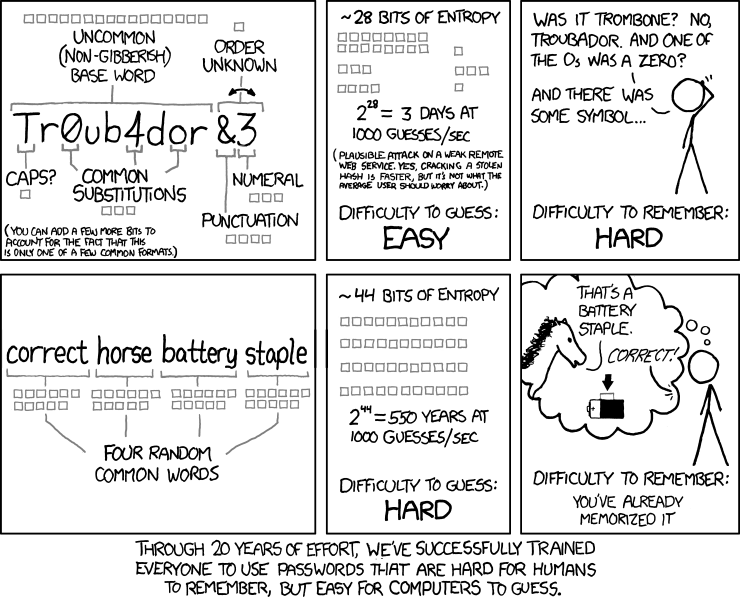
    Now that I convinced you to start using different passwords for different websites, let me include a comic I found that will help you come up with easy to remember, hard to crack passwords:

    How to choose a password

    If you manage or develop a website, see this related article: Protecting User Accounts – Password Management

  • Protecting User Accounts – Password Management

    If you develop or manage a website, there are many reasons to take time and protect user data. Consider if your website is hacked:

    • In the case of eCommerce, fraud can be costly to the user and to the website owner.
    • It can cause privacy concerns and damage your brand.
    • It can allow hackers to spread viruses, send spam, and do a lot more damage through your website over long periods of time without you even knowing it.
    • You can be black-listed by search engines and email providers… making your website hard to find and preventing your emails from reaching any users.

    Here are some tips to protect user accounts

    To store user passwords:
    The Password-Based Key Derivation Function, aka PBKDF2, allows you to store passwords securely, so that even if someone hacks into your database, it will be very difficult and time consuming for them to crack and steal passwords. This is important since many people re-use passwords!

    To reset user passwords:
    1) create a table with user_id, datetime, unique_hash
    2) When a user requests to reset their password, create a unique hash, for example sha1(microtime().’random_salt’). Insert that value in the table and send an email to the user with a link that contains the hash.
    3) when they click the link, check the table for the hash, if it exists, and it is within a time limit (e.g. 3 hours) let them reset their password. When the password is successfully reset, delete the hash.

    To authenticate:
    1) have a “password attempts” field that increments each time a login fails. If there are too many attempts (e.g. 10), even the right password should fail.
    2) if there is a successful login (only before 10 attempts is reached) then the attempts should be set back to zero (this is also a good time to log the website access, including ip address, time, and user id- keeping track of website access is important in case an account is compromised.)
    3) Once locked out, the only way to regain access should be with a password reset, usually done through email.
    The above authentication logic thwarts brute force attacks. Even if a computer can try millions of passwords and guess the correct one, by the 11th attempt it will be locked out.